
Open the TikTok account you used, go to Profile, open the menu, and select Balance. Find the Coin total or Coin-management area shown there. For an unexplained difference, compare Coin activity rather than confusing it with creator rewards.
TikTok Virtual Items Policy — United States.
Start with the account, not the number
When several profiles are available on one device, confirm the exact username before reading the balance. A profile picture can be reused, and an account switch can happen without changing the payment source on the phone.
If a purchase was made on the website, compare the receiving username on that order with the profile now open in the app. The Apple or Google account that holds a receipt can also differ from the TikTok profile that should receive Coins.
Write down the username and the time of your check. This makes a later comparison meaningful. Two screenshots of different accounts or different stages of a purchase cannot establish that a balance changed incorrectly.
Find the Coin balance in the available interface
Use Profile, then the menu, then Balance. Look for the area labelled Coins, Get Coins, Recharge, or the corresponding Coin-management option in your version. The screen arrangement can vary by app version, country, and account features.
Do not confuse a reward total, an estimated earnings figure, or a payout record with your spendable Coin quantity. A creator who also buys Gifts can have both viewer-side Coin activity and creator-side reward information in the account.
If you cannot find the label, use current TikTok Help from inside the app. Avoid installing a third-party “wallet checker” just because its search result claims to expose hidden balances. Checking your own account should not require giving an outside site your password or login code.
A LIVE Gift tray can show a useful cross-check
In a LIVE where gifting is available, opening the official Gift panel may show the Coins available for that action. Inspecting the panel is different from activating a Gift; do not tap send simply to test the number.
If the tray and account screen appear inconsistent, consider whether one view has refreshed and whether a recent action is still updating. Reopen the relevant screen on a reliable connection and compare the same account again.
The cross-check is useful for deciding whether you can afford a selected Gift. It does not replace purchase history when you need to explain where the balance came from or why it decreased.
Use a reconciliation rather than a guess
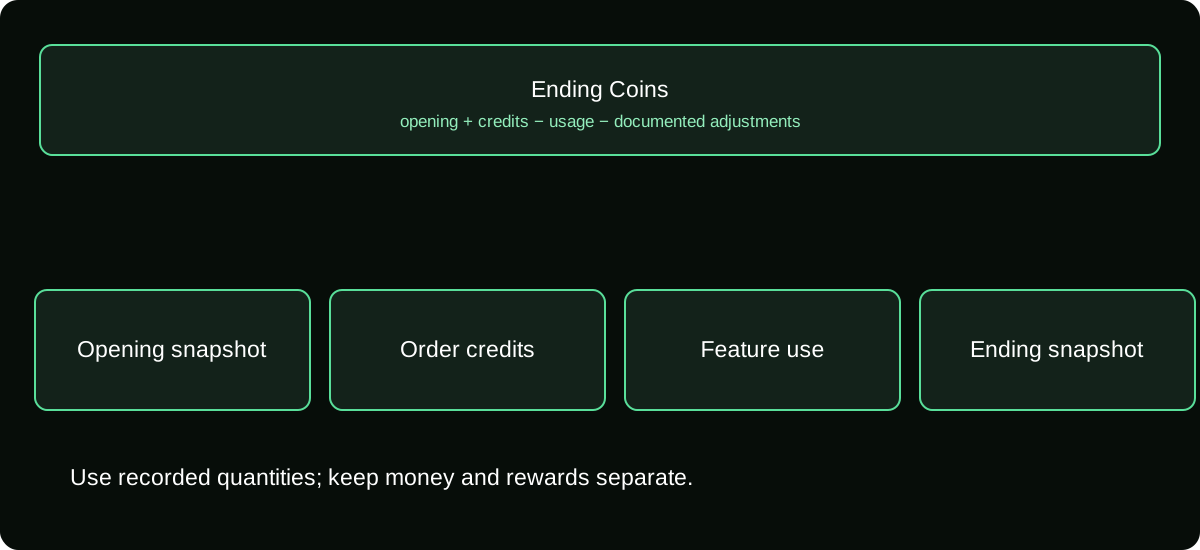
The basic accounting question is:
expected ending Coins = verified opening Coins + credited additions − recorded usage − applicable adjustments
Use the actual entries available in your history. A refund or reversal may be an adjustment rather than ordinary gifting. Include it only when a corresponding record or explanation exists; do not invent an adjustment to make the totals match.
| Record | What to capture |
|---|---|
| Opening snapshot | Username, time, Coin quantity |
| Added Coins | Order reference, credited quantity, posting time |
| Used Coins | Feature or Gift, quantity deducted, activity time |
| Adjustment | Stated reason and relevant order or support reference |
| Ending snapshot | Same account, later time, displayed total |
This is a repeatable method using your own ledger. It avoids assigning an imaginary dollar price to every Coin simply to explain a quantity difference.
Check the timing of recent purchases
A bank message can arrive before an order is completed or the Coin credit is visible. If you checked while payment was pending, your expected addition may not yet be a verified credited entry.
Match the order status with the payment record. A completed charge without the expected Coins is a delivery problem to investigate. An authorization that never becomes a completed order is a different state, even if your banking app temporarily reduces the available balance.
Avoid placing another purchase merely to refresh the number. If both attempts later complete, your balance may be larger than intended while the original explanation is still unresolved. Use the purchase record and appropriate support channel instead.
Investigate a decrease through Coin activity
Review recent Gift activations and other Coin-funded features you used. A screenshot taken before a stream and another afterward do not show which actions occurred in between. The usage ledger is the missing evidence.
Check whether a repeated tap, quantity choice, or another supported action explains the total. If you share a device, also review who had access without immediately accusing another person of fraud. Secure the account when an action is genuinely unrecognized.
Do not assume a creator can inspect or repair your personal Coin ledger. They may know which Gifts appeared in their room, but your account history and billing evidence belong with TikTok or the relevant payment provider.
Understand why a balance is not a cash estimate
The same Coin quantity can have been purchased under different packages or channels. Therefore, converting the balance to dollars using one internet rate can misstate what you paid and what you could do with it.
Coins also are not a creator cash-out amount. If your goal is to check earnings, use the LIVE rewards and payout records for that task. A viewer Coin total does not become withdrawable merely because the profile also creates content.
For spending decisions, use the current Coin charge for the desired feature and the cost of any additional recharge you actually need. That is more precise than treating the existing balance as a bank account with a fixed exchange value.
Report a discrepancy with enough context
Prepare one clear timeline: account checked, opening quantity if known, order or activity references, final quantity, and the unresolved difference. Attach relevant screenshots privately through official help, with unnecessary card and personal information removed.
If you do not know the opening balance, say so. A partial record can still help, whereas an invented starting number makes reconciliation harder. Specify whether the problem is a missing credit, an unexplained usage entry, or a display that does not refresh.
Keep the case reference and avoid scattering the same private records across public comments. The result you need is an explanation tied to an actual entry, not another generic suggestion to restart the app.
Frequently asked questions
Can I check a friend’s balance from their username?
A username is not authorization to access private wallet information. Ask the person to inspect their own account rather than entering their details into a third-party checker.
Does clearing the app cache erase purchased Coins?
Your purchase question should be resolved through account records, not local cache assumptions. Save the account and order evidence before troubleshooting display issues.
Should I keep the balance screenshot after a support case closes?
Retain it with the outcome when it helps explain a purchase or adjustment. Store it privately, especially if it also reveals account or financial information.
Sources and scope
- TikTok Virtual Items Policy — United States
- TikTok Virtual Items Policy — rest-of-world scope stated on the page
- TikTok Help — Diamonds and LIVE rewards