
Common TikTok Coin scams seek your money, login access, payment approval, or gift-card PIN through a false recharge or recovery promise. Identify what the offer asks you to surrender, then verify the claim through independently reached official records and support.
TikTok Newsroom — Security Checkup controls.
Classify the request, not just the advertised reward
A promise of free or cheap Coins can conceal different attacks. One page may ask for a password; another may ask for a card charge; another may request a QR approval that grants account access. The shared branding does not make them the same problem.
Ask what happens before the promised value appears. Do you disclose credentials, authorize a login, pay an unknown merchant, reveal a PIN, or install software? That prerequisite often identifies the risk more clearly than the headline.
Do not decide only from the price. A modest-looking offer can still be unsafe, while a legitimate official offer needs to be evaluated under its actual terms. The issue is verifiable authority and the requested action, not a universal discount threshold.
Coin generators and balance animations
A generator may show a username, a selected Coin amount, and a progress animation, then demand a survey, payment, download, or verification step. None of that is evidence of credit in TikTok's own ledger.
Check whether an official account offer actually exists and what it awards. TikTok can have program-specific promotions, but that does not authorize an unrelated website to create arbitrary balances.
Do not keep completing escalating tasks because a progress bar is nearly finished. The time already spent is not evidence that the next demand will work. Close the flow without surrendering more information and secure access if you already approved something sensitive.
Fake recharge pages and copied checkout
A page can copy TikTok's appearance while using a different destination. Read the actual domain and how you reached it. A search ad, creator comment, or image of a familiar payment logo is not merchant verification.
For a supported web purchase, independently navigate to TikTok's official recharge route. For an app-store order, inspect the actual store payment sheet and merchant record. Do not move to a private invoice merely because a seller says the normal flow is temporarily unavailable.
If you already entered payment information, preserve the suspicious merchant and transaction details. The next step depends on what was disclosed or authorized, not just whether the page later showed an error.
Login, QR, and verification-code traps
Someone may claim they need your password or login approval to add Coins, check eligibility, or repair a failed payment. Those are not equivalent to authorizing a normal purchase through the provider you intentionally opened.
Read QR and device prompts carefully. An unexpected login request can give account access even when the person describes it as recharge verification. Do not approve it to see whether the promise is real.
If access was granted, review devices, recovery information, and other sensitive settings through TikTok's legitimate security controls. Securing only the payment source may leave the account exposed, and changing only the TikTok password may leave a compromised email account unresolved.
Gift-card code theft
An eligible card can be a legitimate product, but its PIN is value that can be redeemed. A seller or supposed helper asking you to post the full code publicly creates a separate risk from the card's purchase terms.
Distinguish a TikTok Coin card from an app-store card and verify region and product before purchase. Redeem through the official destination described by TikTok where supported, not through a private “activation” form supplied in chat.
Keep the original card and receipt. If a code is reported used, do not assume you can identify who redeemed it from that message alone. Ask the relevant issuer, seller, or platform to investigate with the actual purchase and redemption evidence.
Fake support and private refund offers
An account with a staff-looking name may appear after you complain publicly. It may ask for a processing payment, security code, or remote access to approve a refund. Reach support independently instead of using the offered identity as proof.
Refund review belongs with the actual merchant and applicable terms. A private stranger cannot establish authority over an Apple purchase, Google Play order, or TikTok web record simply by quoting your public complaint.
Do not send more money to release money allegedly already owed. The FTC warns about recovery schemes that target people after an initial loss and demand fees or sensitive information. A promise of guaranteed recovery is not a substitute for a real case with the relevant provider.
Resale and stolen-funding risks
An unfamiliar seller may offer to recharge through your account or claim access to a special pool of Coins. Even an initial credit does not by itself prove the arrangement is authorized or that the underlying payment is legitimate.
Distinguish that private delivery promise from a verifiable supported gift-card product. Read the product and issuer terms rather than banning or trusting every item with the same logo.
Do not buy a loaded account as a replacement for a normal recharge. Account access and virtual-item terms create separate issues, and possession of a password does not establish a legitimate transfer or secure long-term ownership.
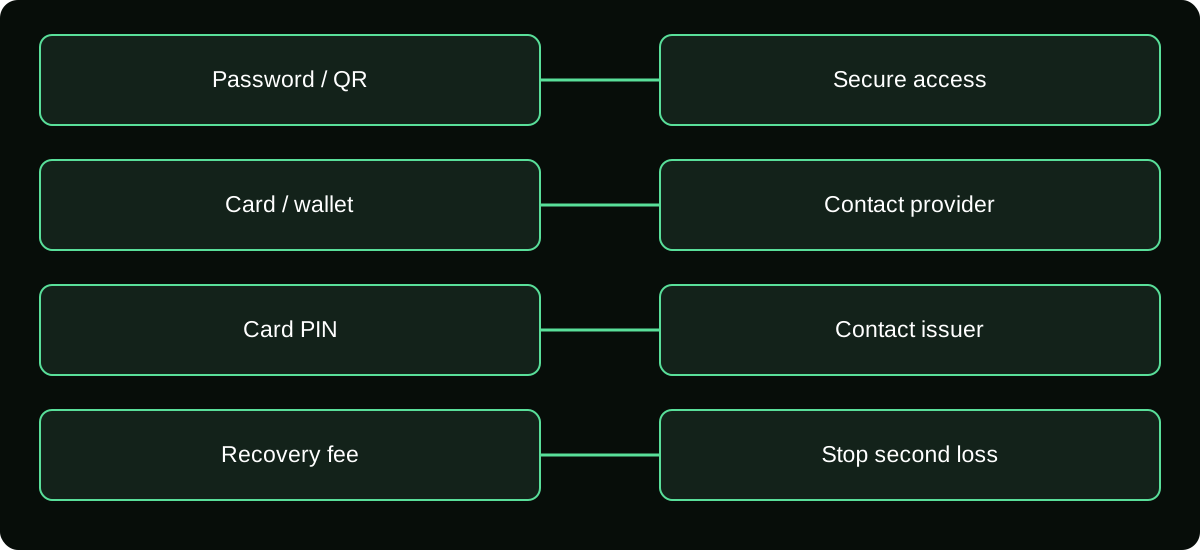
Match the response to what was exposed
| Exposure | First useful response |
|---|---|
| Password or login approval | Secure account access and recovery routes |
| Card or wallet payment | Contact the actual provider about the transaction |
| Gift-card PIN | Contact issuer or seller with the original evidence |
| Identity document | Seek relevant identity-protection guidance and report exposure |
| Suspicious software | Stop sensitive activity on the affected device and use trusted security help |
Preserve evidence without continuing the interaction. A screenshot, merchant reference, message time, and account identifier can help a legitimate investigation. Do not publish all those details in an attempt to crowdsource a refund.
Replace the claim with a verifiable transaction
For normal purchases, inspect the receiving account, quantity, merchant, final amount, and Coin credit. For creator earnings, use reward and payout records. For a promotion, use its actual official terms and account availability.
These checks are more robust than memorizing a list of scam names. The name and design can change; the demand for money or access before unverified value arrives remains the decision to examine.
If you already lost money, contact the company used to pay promptly and ask what remedies exist. Recovery is not guaranteed. Keep the explanation truthful and use the relevant local reporting route rather than paying another person who promises to erase the first loss.
Frequently asked questions
Can a Coin scam start from a sponsored search result?
A sponsored placement does not independently validate the merchant or the promised platform feature. Reach official purchase and support routes yourself rather than treating ad placement as authorization.
Can a scam use an account belonging to a real friend?
Yes, an account can be compromised or impersonated. Verify an unexpected financial request independently rather than relying only on a familiar name or conversation history.
Should I confront the seller to obtain proof?
Do not risk further payment, access, or personal disclosure to test a claim. Preserve existing evidence and use legitimate provider and reporting channels.
Sources and scope
- TikTok Newsroom — Security Checkup controls
- TikTok Virtual Items Policy — rest-of-world scope stated on the page
- U.S. FTC — what to do if you were scammed
- U.S. FTC — refund and recovery scams