
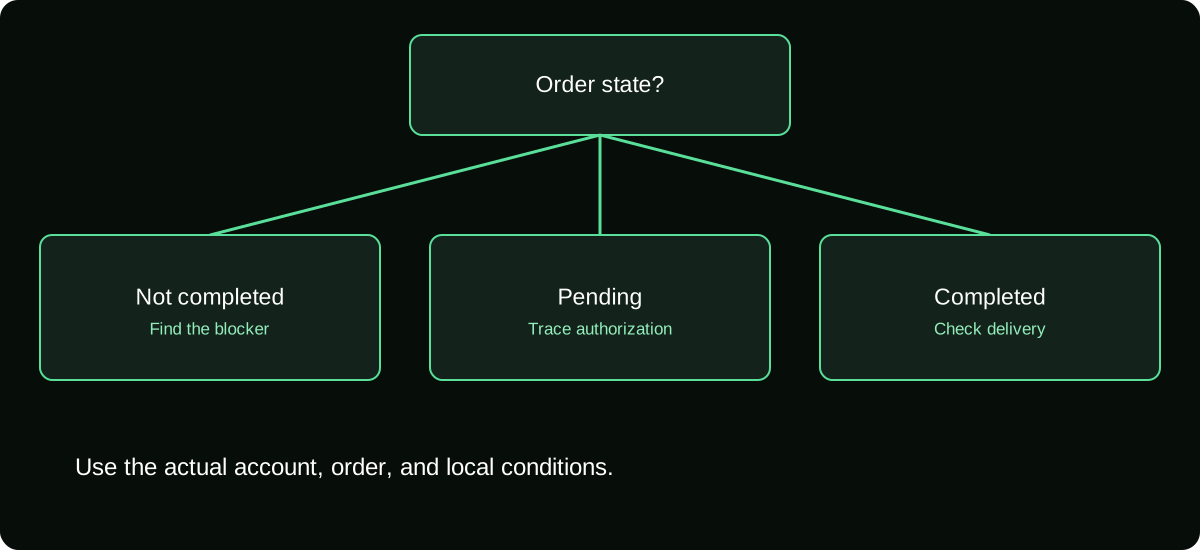
First check whether the Coin order failed, remains pending, or actually completed. Then investigate the specific blocker: account eligibility, checkout availability, payment authentication, billing restrictions, or a technical error. Do not repeatedly pay until the first attempt’s status is clear.
TikTok Help — Gifts, purchase routes and supported gift-card redemption.
Establish the state of the first attempt
Open the receipt or order history for the merchant involved. Compare it with your TikTok Coin activity and the payment provider's status. A failure message on one screen does not prove that every part of the transaction stopped.
If an order completed and the balance did not increase, you need a delivery investigation. If only a pending authorization exists, you need to understand whether the payment will complete or be released. If nothing was authorized, a controlled retry may be appropriate after addressing the error.
Record the first attempt before changing anything: account, merchant, amount, currency, package, time, and exact message. That baseline lets you distinguish a later successful purchase from the unresolved earlier request.
Check whether the account can make this purchase
Confirm the required age, country availability, and account status using TikTok's current instructions and any notice shown. Viewing LIVE content does not establish eligibility to buy or use every virtual-item feature.
If recharge is restricted on the account, adding a different card is unlikely to solve that underlying issue. Review the reason or appeal route presented by TikTok. Do not buy another account or change personal details to evade the restriction.
Also confirm that the route you selected is supported. An unavailable web checkout does not prove the app is broken; an app-store purchase limitation does not mean a private recharge seller is authorized to complete it for you.
Identify who declined or blocked the payment
| Evidence | Likely party to ask first | Useful question |
|---|---|---|
| Store says purchases are restricted | App-store account or family administrator | Is this account permitted to make this purchase? |
| Card issuer declines authorization | Card issuer | Was the attempt declined, and why? |
| Wallet requires authentication | Wallet provider | Can the legitimate approval be completed? |
| TikTok reports account ineligibility | TikTok | What account or feature condition applies? |
| Generic technical failure | Merchant support after status checks | Did a task or order begin despite the error? |
The table is a routing aid, not proof of cause. Use the actual message and transaction state. A general network error cannot identify a card decline by itself.
Do not share a verification code with a person who claims to approve payments manually. Complete authentication only inside the legitimate provider flow you opened.
Review the payment details without exposing them
Inspect expiry, billing information, available funding, and any provider requirement relevant to the chosen method. A card can work at one merchant but be restricted for another transaction type. Ask the issuer about the actual attempt rather than assuming a balance check proves approval.
For an app-store order, verify that the correct store account is signed in and that unresolved account or billing requirements are addressed. Store settings can affect a purchase independently of TikTok's login.
If a foreign-currency total appears, consider whether your provider supports that charge and what conversion applies. Do not change the account country casually to make the price or method appear; resolve the legitimate billing mismatch.
Troubleshoot technical conditions after preserving evidence
Use the current official app or website on a reliable connection. Reopen the relevant screen, check for a supported app update, and make sure a browser is not blocking a legitimate payment confirmation or redirect.
Avoid clearing data, reinstalling, or switching accounts before saving order details. Those steps can make it harder to reconstruct which account received the attempt, even when they address a display issue.
Changing several variables at once also hides the cause. If the transaction is definitely uncompleted, make one relevant correction and document the next attempt. Do not cycle rapidly through cards and wallets while previous requests remain unresolved.
Know when a retry is reasonable
A retry is more controlled when the earlier order is confirmed unsuccessful, no completed charge or credit exists, and a specific blocker has been corrected. That might be a resolved issuer restriction or a payment authentication that can now complete.
A retry is not a diagnostic substitute when a charge has posted or the first order is pending. Paying again may create two successful purchases, each valid on its own, rather than replacing the first request.
If you try another official route, keep it separate in your records. Note that the merchant and refund process may change. The new route's success does not automatically cancel or reimburse the original attempt.
Give support an actionable failure report
Use a concise timeline: what you attempted, the exact error, what the payment record says, and whether any Coins arrived. Attach the relevant order and a redacted screenshot, not your full banking profile.
Ask a concrete question such as whether the order exists, whether an authorization completed, or what account restriction applies. “It doesn't work” leaves all of those possibilities open and often produces an equally broad response.
Keep the case identifier and the action recommended. If support asks you to wait under a stated process, record the relevant status and follow-up point. Do not turn an unofficial internet estimate into a promised delivery or reversal deadline.
Close the issue only after matching payment and credit
After a successful purchase, verify the receiving account and credited quantity. After an unsuccessful attempt with a pending authorization, check the payment provider's final outcome. These are different ways for the case to close.
If you find a charge nobody authorized, stop routine troubleshooting and protect the payment and login accounts. If you recognize the purchase but not the recipient profile, investigate account selection and evidence rather than filing an inaccurate unauthorized-charge report.
The useful result is a known transaction state and a specific reason or remedy. A stream of new attempts without a record can leave you with more charges and less clarity than you had at the beginning.
Frequently asked questions
Does a successful small purchase prove a larger one will work?
No. Transaction size, provider controls, available funds, and account conditions can affect later requests. Treat the larger checkout as a separate authorization.
Should I ask the creator to fix my checkout?
A broadcaster does not administer your store account, card authorization, or private Coin order. Use the merchant or payment provider identified by the transaction evidence.
What if the error disappears but I never bought Coins?
Check order and payment records before assuming a purchase happened. A working interface and a completed paid order are different outcomes.
Sources and scope
- TikTok Help — Gifts, purchase routes and supported gift-card redemption
- Apple Support — request a refund; pending-charge limitations
- Google Play Help — refund requests and undelivered in-app purchases