
Join the creator’s LIVE, open its Gift control, choose an available Gift, check the Coin amount, and confirm the action shown. You need an eligible account, an enabled gifting feature, and enough Coins for the selected action.
TikTok Help — sending a Gift during a LIVE.
Verify the recipient before opening the Gift tray
Confirm that you are watching the intended creator, especially when clips, co-hosting, or similar account names can make a room confusing. A familiar video or avatar is not enough if someone is impersonating the broadcaster.
If the interface lets you choose among participants, review the selected recipient before sending. Do not assume that a Gift in a multi-person room goes to the person whose face is largest. Follow the recipient information actually displayed by TikTok.
Check your spending limit before the stream becomes busy. Decide what you are comfortable using during this session, and treat any gifting reminder as a prompt for deliberate action rather than a reason to exceed that amount.
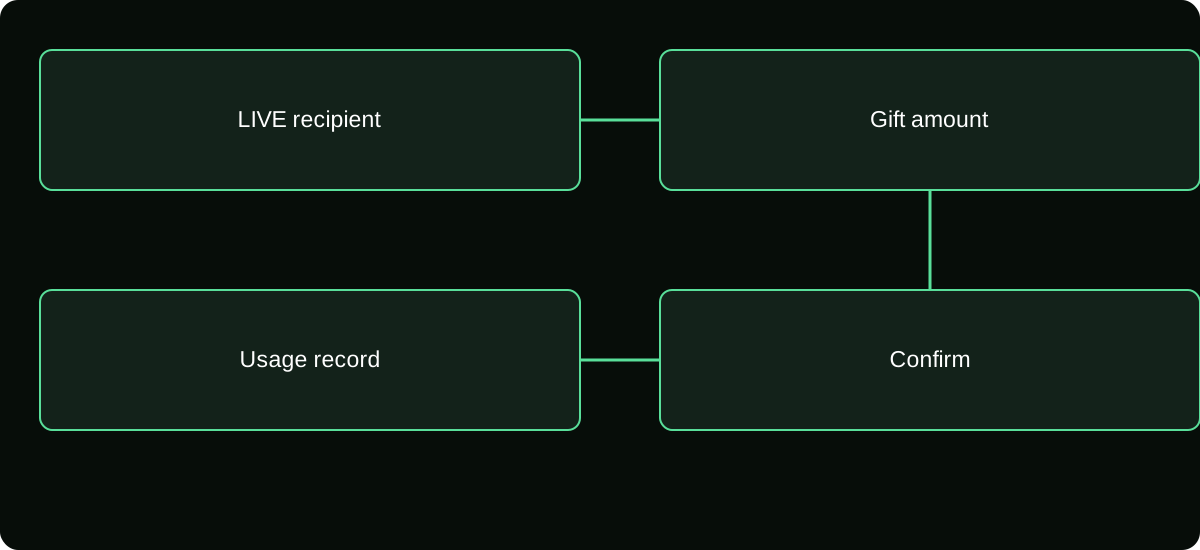
Send the Gift in the available LIVE interface
- Enter the LIVE and find the Gift button or gifting control shown in that room. If it is absent, investigate availability rather than tapping unrelated links in chat.
- Open the Gift selection and inspect the Coin amount for the item you intend to send. Names, designs, and available items can change.
- Confirm the recipient and any quantity or repeat setting presented. A repeated action can use more Coins than the single item's label.
- If the balance is insufficient, decide whether to recharge through official checkout. Leaving the room to review the purchase is acceptable.
- Use the send or confirmation control displayed. Watch for the result, then inspect your balance or Coin activity if you need to verify the deduction.
TikTok's Gifts help documents using the Gift button during a LIVE. This is distinct from sending a Gift through the comments on an eligible posted video; those are different interfaces.
Understand the displayed Coin amount
A Gift's Coin requirement is the quantity needed to activate that item, not an ordinary-currency payout to the creator. Your original recharge cost may depend on the package and channel used. The creator's rewards are recorded separately.
Do not use an online Gift table as your final authorization. A list can be outdated, omit a regional variation, or refer to a different item with a similar design. The current tray and confirmation are the relevant purchase-use information.
If the action includes a quantity or combo behavior, inspect the resulting total. Avoid repeatedly tapping while the screen is slow. You may create multiple valid activations even if the animation appears later than expected.
If the Gift button is missing, identify the scope
Compare the room and your account without attempting an unofficial workaround. Is gifting unavailable only in this LIVE, or across supported LIVE rooms? Is the creator allowing the feature? Does your account meet the relevant requirements?
An app update can address an interface problem, but it does not grant age eligibility or regional access. Similarly, a larger Coin balance cannot enable a feature TikTok has not offered to your account or that a creator has disabled.
Use TikTok's current LIVE help and any account notice for the reason. Do not change your birthday, purchase a different account, or hand a reseller your login merely to expose the Gift tray.
Separate a missing animation from a missing transaction
A visual effect is not the complete transaction record. Network conditions, display settings, or a crowded room can affect what you see. Check Coin usage before deciding that the first send failed.
| Evidence | What it helps establish |
|---|---|
| Gift confirmation in the interface | The action the app accepted or attempted |
| Coin usage record | Whether Coins were deducted for an eligible action |
| Remaining balance | A current total, requiring history for explanation |
| Creator acknowledgement | A social response, not a payment receipt |
A creator missing your username does not prove TikTok failed to process the Gift. If the deduction exists but the action seems wrong, preserve the record and use the platform's reporting route rather than sending a second Gift as a test.
Do not expect a private acceptance or cash refund
Gifting is an in-platform interaction. It is not normally a transfer of cash that waits for a creator to accept in a private wallet. Be skeptical of messages asking for a release fee, refund deposit, or account code after you send something.
The applicable virtual-item terms determine what happens when an item is used. A completed Gift should not be assumed reversible because the stream ended, you changed your mind, or the creator did not reply.
For a genuine unauthorized purchase or technical defect, document the relevant purchase or usage event and follow the correct support process. Describe the actual issue truthfully instead of recasting an intentional Gift as an unapproved card charge.
Make appreciation proportionate and voluntary
A Gift can be a pleasant way to support content you enjoy, but it does not buy a personal relationship, guaranteed attention, or a financial return. Decide based on the experience you want to support, not a promise of preferential treatment from an unknown account.
Avoid arrangements that make a Gift the entry fee for an unverified prize or investment. A broadcaster's announcement does not make every promotion authorized, lawful, or supported by TikTok.
If you feel pushed to send more than planned, close the tray and take a break. You can continue watching, comment normally where allowed, or leave. The lack of a paid action does not make you responsible for a creator's targets.
Finish with a clear activity check
When accuracy matters, note the creator, session time, chosen Gift, displayed Coin requirement, and any usage entry. This gives support a concrete event to investigate without exposing private payment credentials to the room.
For future sessions, use the amount left after verified activity as your starting balance. If it differs from your expectation, reconcile it before buying again. The task is to send one intended action to the intended recipient, not simply to make the largest animation appear.
Frequently asked questions
Can I send a Gift to someone watching the LIVE rather than hosting it?
Use only recipients and actions the official interface explicitly supports. A viewer asking for a Coin transfer in private messages is not the same as a supported LIVE gifting action.
Should I include payment details in a message accompanying a Gift?
No. A public or creator-facing message is not a private billing-support channel. Keep transaction evidence with the merchant or platform process that actually handles the purchase.
What if I accidentally choose the wrong participant?
Save the event details and use official help if you believe an error occurred. Do not assume the recipient can transfer virtual items back or arrange a private cash reversal.
Sources and scope
- TikTok Help — sending a Gift during a LIVE
- TikTok Help — Gifts, purchase routes and supported gift-card redemption
- TikTok Help — Gift limit notification